When I looked at the syllabus in the class and read the words Twitter and blog I was frighten some. I nearly panicked. I had never had interest in social media. As the weeks went by things weren't as bad as I expected. I had fun doing the assignments. I also was able to brag a little that I am able to do more things on the computer than my little brother who is pretty good with the computer and social media.
I enjoyed creating the Vine video, cartoons and the Screencasts. I like how easy it was to do the Vine video. The only difficulty I had was embedding the video into the blog. (Like a few other assignments.) My first semester in the library science program a professor used the screencast and I thought I wish I could do that. Then, I had the opportunity to do one. I think they are helpful in teaching in the classroom or even sharing with family and friends. It took me a while to figure out using one of the cartoon websites, but I enjoyed. I think more so that I do not draw well.
Doing the infographics and QR codes were difficult for me. I had a hard time choosing the best template for the information I needed to relay. It took me hour navigating between three different sources to create what I needed. With the QR codes I spent a great deal of time trying to embed it into my blog.
I think that podcast can be useful for students. My ideas was to use podcast like an audiobook. Students can benefit from examples of fluent reading. It's as if someone is reading to them. Many of my students are not read to as six year-olds. I believe that cartoons can benefit students as well. They can be incorporated across the curriculum.
Through my experiences with assignments in this class, I learned to try. I'm not big on social media, but it has many benefits. Technology not only makes our job easier but can help keep students engaged. In reference to the article, I can see how we look at our communities through the eyes of advantage assuming we know best. As a teacher I think in my first years I expected more than my students were able to give thinking I knew what was best for them and didn't fully realize their needs and weaknesses. I want to make sure that as a librarian that I am sure to involve the school community and do some ground work. I want to know that culture of the school community and what can be added or taken away from what is already been done.
Wednesday, December 7, 2016

Sunday, November 20, 2016
Media is the message deate
There is a debate about media. Richard Clark argues that media "do not influence student achievement any more than the truck that delivers our groceries causes change in our nutrition." While Robert Kozma argues that learning tasks can be done with media can media. This debate that was made by Clark in the early 1980's is still being discussed in 2016, thirty-three years later.
I agree with Kozma's argument. He says that media says that the question should be "In what ways can we use the capabilities of media to influence learning for particular students, tasks, and situation?" The capabilities relate to technology, symbol systems, and processing capabilities. Kozma defines technology as "the physical, mechanical, or electronic capability of the medium." In addition , "its primary importance is in the way it communicates and presents information. " Just having computers isn't technology. It also includes how things are delivered and received.
Having computers in the classroom doesn't mean that students are learning. From my short ten years in education I have went from feeling the way Clark feels about to technology to the way Kozma argues technology/media. Technology through computers is one of the tools for learning. There are times when there are issues with the technology in the classroom. I was without the promeathean board, document camera, and and access to display any visuals to students. It was back to chart paper or the dry erase board and markers. For me it was comfortable to present information that way, but only about half of the students were receptive of the information. Students like to interact in their learning. The use of programs and visuals to aid in learning aids to in receiving and processing information. The role of technology in education has changed. Teachers have to learn high tech ways to present information therefore changing the way information is delivered. Educators are using blogs, videos to share information and get input from learners.
When students can google it or find it on youtube, as educators its important to integrate media/technology into instruction to engage the learner. I agree with Dave Moffat's conclusion of Clark and Kozman's debate. "The debate is finished and the winners are everyone. Design is the key influence to learner. Both medium and method are important elements in the design. To reach today's learner, we must include technology or the learner will eek it out alone."
References
https://dcmoffat71.wordpress.com/2013/04/17/clark-and-kozma-debate-is-it-still-relevant/
Mellon, C. (1999). Technology and the Great Pendulum of Education . Journal of Research on Computing in Education. 32(1). pp.28-36. Retrieved from
The media debate. (2012, August 30). Retrieved November 17, 2016, from http://edutechwiki.unige.ch/en/The_media_debate
Sunday, November 13, 2016
Podcast
This week was a rough week for me teaching. I lost my voice for two days. When I did have my voice it wasn't normal. Congestion from sinus and allergies made it difficult for me to talk. At one point I found a screencast to teach fact families to students. Well, this week I tried a few websites that allow you to do podcasts. I thought to myself it would be a great idea to go ahead and record the selection of the week for my reading lesson. Something different every so often can capture student's attention.
The first podcast I tried was SoundCloud. It was easy to sign up. I just simply used my google account information. It was easy to navigate. I found the upload button. It gave me the choice to upload a file or began recording. I chose to start start recording right away. I figured it would be best to start with partner engagement activity. It was easy to record, add a title and information, and then save the recording. I figure that students can use this like an audio book. We have computers in the classroom, but the new ones will not read the cds with the story selections. Students can follow along a listen to the story while at the computer. The only thing that I didn't like about sound cloud was that I could not pause and continue with the recording.
https://soundcloud.com/jennifer-adams-560091007/a-big-fish-for-max
I then tried PodOmatic. To sign up for PodOmatic I could use my Facebook account or my email. To create an episode I recorded the selection with my phone. After saving the file to my computer I added and uploaded the file. What I like about this one was that it gave me a choice to upload a picture or image. This too was easy to use. Being able to record with my phone or computer I could stop and edit my recordings.
The last one I tried was audioBoom. I was able to sign up for an account and have my email address verified. I had to apply to do a podcast. While waiting for permission I have the option to listen to other podcast. I saw AudioBoo as well. I was able to get the app on my computer , but was unable to use it.
I plan to use podcast like an audiobook. When I checked out the link http://www.booklistreader.com/tag/audiobooker/ the author Stephen King talked about how he used audio books for entertainment. He mentioned that he like to listen to books while taking a walk or while multitasking. I can use podcast to scaffold and differentiate learning for learners in my classroom. I will first use it as a whole classroom lesson this Tuesday! I am still having trouble with my voice and still have to teach.
Burkey, Mary (2016, July 5). Stephen King Declares "Audio Books Are Terrific". Booklistreader, Retrieved November 13, 2016 http://www.booklistreader.com/tag/audiobooker/
The first podcast I tried was SoundCloud. It was easy to sign up. I just simply used my google account information. It was easy to navigate. I found the upload button. It gave me the choice to upload a file or began recording. I chose to start start recording right away. I figured it would be best to start with partner engagement activity. It was easy to record, add a title and information, and then save the recording. I figure that students can use this like an audio book. We have computers in the classroom, but the new ones will not read the cds with the story selections. Students can follow along a listen to the story while at the computer. The only thing that I didn't like about sound cloud was that I could not pause and continue with the recording.
https://soundcloud.com/jennifer-adams-560091007/a-big-fish-for-max
I then tried PodOmatic. To sign up for PodOmatic I could use my Facebook account or my email. To create an episode I recorded the selection with my phone. After saving the file to my computer I added and uploaded the file. What I like about this one was that it gave me a choice to upload a picture or image. This too was easy to use. Being able to record with my phone or computer I could stop and edit my recordings.
The last one I tried was audioBoom. I was able to sign up for an account and have my email address verified. I had to apply to do a podcast. While waiting for permission I have the option to listen to other podcast. I saw AudioBoo as well. I was able to get the app on my computer , but was unable to use it.
I plan to use podcast like an audiobook. When I checked out the link http://www.booklistreader.com/tag/audiobooker/ the author Stephen King talked about how he used audio books for entertainment. He mentioned that he like to listen to books while taking a walk or while multitasking. I can use podcast to scaffold and differentiate learning for learners in my classroom. I will first use it as a whole classroom lesson this Tuesday! I am still having trouble with my voice and still have to teach.
Burkey, Mary (2016, July 5). Stephen King Declares "Audio Books Are Terrific". Booklistreader, Retrieved November 13, 2016 http://www.booklistreader.com/tag/audiobooker/
Sunday, November 6, 2016
Comics and Cartoons
Comic strips can be used to reinforce rules or concept in the classroom. On the campus where I work students draw comics to show understanding of a concept as a formative assessment. I like the fact that there are three FREE websites to create comic/cartoon strips. I will explain my experience with using the websites to create comic strips.


The first website I used was Make Beliefs Comix. This site does not require you to sign up. You can start creating the comic right away. It automatically starts with three panels. You have the option to choose from about forty characters, eight talk balloons, eight thought balloons, background colors, and a choice of two, four or three panels. This was very easy to use. I could see elementary students being able to use this website easier. I am constantly reminding my students how to take care of books. So, I decided to make a strip about caring of books.


I had to create an account to use this site. When creating a you can choose the number of panels you want and the direction. There can be 1-4 panels either horizontal or vertical. You have the option of characters, backgrounds, props, conversation bubbles, or upload your own pictures. You also have the option to redo a comic strip that is already published. For some reason I had more trouble than I should using this website. I had to do some resizing to get my text to fit inside the conversation bubbles. I thought the characters with the phones were cute so I decided to use them. Overall it's fairly easy to use. It has a lot of character options that students would enjoy using.


I
used Pixton to create a strip of the writing process for my classroom. I chose a character and added conversation
bubbles.When I added another panel it
copied the character from the first panel and the conversation bubbles and I
just added text. This site was easy to
use. I could not download the cartoon
with the free account. I was only able
to share by email. I did the one below
first. Then after not remembering how to
add the comic to my blog I decided to create another comic strip for a word
problem. If you can tell me how to easily embed the comics to my blog please leave a note in the comment section.
I
am a classroom teacher. I would like to
use comic strips as reminders in centers and introducing character traits. I could even add comic strips to the
classroom newsletter or remind app. Make
belief comix actually gives a list of 25 ways to use comics in the class
including introducing social skills, practice new vocabulary words, practice
social skills, or promote team collaboration.
I am sure there are many great uses for comic/cartoon strips in the
classroom or library.
I referred to this website
Zimmerman, B. How to play with Make BeliefsComix.com. Retrieved November 6, 2016 from
Sunday, October 30, 2016
Videos and QR Codes in the Library
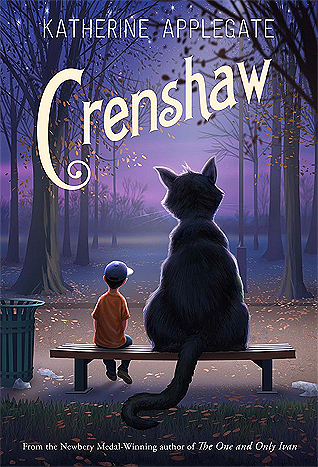
I saw some really nice videos done in the library on Youtube. I don't remember the library being so much fun while I was in school. I plan to share and create videos when I get a librarian position. So, I can create a book trailer and a QR code? That's what I asked when I saw this task. So I dine decided to do a trailer about the book Crenshaw by Katherine Applegate. Something about this family's resilience just tugs at my heart.
I saw some videos from the Norman Public Schools. One video "Norman Public Schools Celebrates Your Freedom to Read featured different readers reading different book that are popular children books. The other video I enjoyed was the school mascot a "tiger" visits the library and uses the computer to check out a book about tiger and later returns it. The "Unquiet Library" had a unique library on wheels. A librarian had books on a cart and a computer and students were able to check out books while at lunch. I thought is interesting and risky. What if they spill a drink on a book? There was another video of scenes from the library. It's always refreshing to see what others do in their library. The Pikesville Library featured a Hip Hop Day at the library. They were able to Skype one of the artist from Flocabulary among other things. The librarian also share a snapshot of things done in the library. The mission of the library is to Create, Research, Share and Learn. My favorite videos came from bbmsmedia. I know that my students would enjoy the Fifth Harmony Overdue Library Book Parody. It's a repetitive song that is catchy with a beat and done by students. Students will like this one best because they will remember the message because the way its presented. The Hotline Overdue Drake Library Parody is most helpful because there is a teacher included. I look at that as teachers have to follow the rules too.
https://animoto.com/play/x5OCqVHaXHTX50J5GFVwKg#
Please scan the QR code above to see the trailer. I also included the link to the trailer. Crenshaw is a book about a boy who has an imaginary friend who comes around when his family is having a hard time. This cat who continues to grow helps Jackson cope with the stress and struggle the family endures.
Publisher Synopsis
In her first novel since winning the Newbery Medal, Katherine Applegate delivers an unforgettable and magical story about family, friendship, and resilience.
Jackson and his family have fallen on hard times. There's no more money for rent. And not much for food, either. His parents, his little sister, and their dog may have to live in their minivan. Again.
Crenshaw is a cat. He's large, he's outspoken, and he's imaginary. He has come back into Jackson's life to help him. But is an imaginary friend enough to save this family from losing everything?
Beloved author Katherine Applegate proves in unexpected ways that friends matter, whether real or imaginary. (Synopsis from Goodreads)
We do a lot of guessing games and sharing of information at the campus where I work. I can use this during black history month and poetry month to share information on display. I see QR codes are use to track things, get quick information and for labeling. It's a good quick way to get information.
Citation
Applegate, Katherine. (2015). Crenshaw. New York, New York: Feiwel and Friends.
Sunday, October 23, 2016
Instagram, Vine and Screencast
Teachers are using Instagram in the classroom? When I saw this website I was definitely surprised. I never imagined using Instagram in the classroom. Now that I see how it can be used I figure why not use the app in the classroom. Today, I will show you three things I got a chance to experiment with, screencast-o-matic, Vine, and Instagram.
When I think of Instagram I think of posting selfies or vacation photos. I never would thought about using Instagram in the classroom or personally to be honest. So when exploring options I chose to post two pictures as a compare and contrast. I like the fact that I can use my phone features to do a side by side picture for easy comparisons. I can also use this to display exemplary student work. Also, to display for coworkers finished products of student projects.
I had never heard of Vine until I had to do this assignment. I plan to use this as reminders for students of character traits we discuss each morning in circle time. I can use it for transitions during the day. The video below is clip of the suggested homework environment. I really like the Vine app.
I have seen screencast to do training for first grade math. They were very helpful. It's like having the hands on experience when learning something new. I can use this to introduce the new literacy program to students. I always find screencasts helpful. Here is one that I did.
Sources
Hudson, H. (2014, August 7). 10 surprising ways to use Instagram in the classroom.
Retrieved October 22, 2016 from
http://www.weareteachers.com/10-surprising-ways-to-use-instagram-in-the-classroom-2/
Pictures from
https://www.flickr.com/photos/usnationalarchives/4727537268
Retrieved October 23, 2016
https://www.tonasgraphics.com/wordpress/category/uncategorized/
Retrieved October 23, 2016
(via https://t.co/xqbJ52x6gs)— Jennifer Adams (@mrsjadams13) October 24, 2016
I have seen screencast to do training for first grade math. They were very helpful. It's like having the hands on experience when learning something new. I can use this to introduce the new literacy program to students. I always find screencasts helpful. Here is one that I did.
Sources
Hudson, H. (2014, August 7). 10 surprising ways to use Instagram in the classroom.
Retrieved October 22, 2016 from
http://www.weareteachers.com/10-surprising-ways-to-use-instagram-in-the-classroom-2/
Pictures from
https://www.flickr.com/photos/usnationalarchives/4727537268
Retrieved October 23, 2016
https://www.tonasgraphics.com/wordpress/category/uncategorized/
Retrieved October 23, 2016
Sunday, October 16, 2016
Infographics
I had an interesting day of learning what infographics are and how they are used. I listened to a podcast, read at least three articles, watched tutorials and signed up for three websites that helps you create infographics. I have always thought that infographics were interesting, but never knew the name. I have to admit that watching the online tutorials made creating an infographic look very simple. 'It wasn't so easy for me when I sat down to do one. I thought maybe because of the information that I was to present from the article.
I started with a template from https://piktochart.com/. Now, this is suppose to be a easy website to use. Well, I was challenged a little. I used a template that was already created that which is a suggestion for first time users. I found an interesting template that I worked with. I had data and titles put in the template. I tried to add a chart/graph to the page. I was confused and had too many options. So, I stopped there and tried another source. I later came back to work with the site a little more and start having success, but had already finished my infographic using another source.
I then went on to try infogr.am (https://infogr.am/app/#/library). I was able to create a nice line graph. When I wanted to add more info I kept getting a message to upgrade to PRO. Well, I like free things so, I didn't bother to do an upgrade. This site was easy to use to create an infographic. I just didn't like that it constantly asked you about upgrade.
I chose to use easel.ly (https://www.easel.ly/). I was able to use a simple template to relay the data from the article I read. My infographic is simple, but I am proud of it as my first. I felt like I was able to use this like I do Microsoft Word. There isn't a large selection of pictures or photographs to use unless I upgraded my account.
Overall, I would use easel.ly or infogr.am to do an infographic. I used the article 15% of American Adults Have Used Online Dating Sites or Mobile Dating Apps from Pew Research Center for my information.
My infographic
https://www.easel.ly/create?id=https://s3.amazonaws.com/easel.ly/all_easels/2143197/Onlinedating&key=pri
Citation
Smith, Aaron. (2016, February 11). 15% of American Adults Have Used Online Dating Sites or Mobile Dating Apps. Pewinternet.org. Retrieved October 16, 2016 from http://www.pewinternet.org/2016/02/11/15-percent-of-american-adults-have-used-online-dating-sites-or-mobile-dating-apps/.
I started with a template from https://piktochart.com/. Now, this is suppose to be a easy website to use. Well, I was challenged a little. I used a template that was already created that which is a suggestion for first time users. I found an interesting template that I worked with. I had data and titles put in the template. I tried to add a chart/graph to the page. I was confused and had too many options. So, I stopped there and tried another source. I later came back to work with the site a little more and start having success, but had already finished my infographic using another source.
I then went on to try infogr.am (https://infogr.am/app/#/library). I was able to create a nice line graph. When I wanted to add more info I kept getting a message to upgrade to PRO. Well, I like free things so, I didn't bother to do an upgrade. This site was easy to use to create an infographic. I just didn't like that it constantly asked you about upgrade.
I chose to use easel.ly (https://www.easel.ly/). I was able to use a simple template to relay the data from the article I read. My infographic is simple, but I am proud of it as my first. I felt like I was able to use this like I do Microsoft Word. There isn't a large selection of pictures or photographs to use unless I upgraded my account.
Overall, I would use easel.ly or infogr.am to do an infographic. I used the article 15% of American Adults Have Used Online Dating Sites or Mobile Dating Apps from Pew Research Center for my information.
My infographic
https://www.easel.ly/create?id=https://s3.amazonaws.com/easel.ly/all_easels/2143197/Onlinedating&key=pri
Citation
Smith, Aaron. (2016, February 11). 15% of American Adults Have Used Online Dating Sites or Mobile Dating Apps. Pewinternet.org. Retrieved October 16, 2016 from http://www.pewinternet.org/2016/02/11/15-percent-of-american-adults-have-used-online-dating-sites-or-mobile-dating-apps/.
Sunday, October 9, 2016
Feedly
Keep it Simple! This seems to make life easier doing so. Staying organized helps me to keep things simple. I need things together and put in the right place. I get extremely frustrated when I misplace something or didn't put something in the right place. I loose a lot of time looking for things. Then when it comes to finding something I found on the internet I finally learned to use bookmarks.
I was excited about blogging and looking at other people's blog. When I signed up for twitter and began "following" people I enjoyed ease of use. That is how I feel about Feedly. It is easy to use and organize. This is a "free" website to use. I read the article The 10 Best Feed Reader Apps for RSS, News and More by Vicky Cassidy two or three times before fully understanding what the feed reader it. You can find this article on the following link https://zapier.com/blog/best-rss-feed-reader-apps/ I first chose Feedly because it is free. Majority of the other apps had a cost. I'll take free any day. Also, Cassidy said"Feedly is designed to be a simple way to build your own news feed about your favorite topics." There you have it, simple. That is the other reason I chose to use this feeder. Feedly also gives users a starting point with popular sources to choose from or a search. You to discover and follow or search by topic or URL.
When I signed up it was quick and easy. Feedly is is easy to set up and organize. I created a folder for Librarian Stuff. The first thing I pinned was School Library Journal (http://www.slj.com/slj-blog-network). I chose this because it lists new books and reviews for the books. I think that this will be helpful as a librarian to choose new books. I like it personally because my family and I enjoy reading and like to explore new titles and authors.
Another pin is Goodreads (https://www.goodreads.com/blog/index.) I enjoy Goodreads is because I can see reviews of books from more people. Goodreads will give you news about your favorite authors. I noticed that a recent feed gave information about Self Published Author's on Indie Day. I now have Goodreads in one central place with other blogs I am following. I look forward to hearing about book signings and new releases from my favorite authors. I also chose Library Displays . While I consider myself a organized person I am not creative. As a future librarian I will need some ideas about to organize and decorate things in the library. I saw a display that showed a set up for Bee Awareness Month. When I visited The Children's Book Review at (https://www.thechildrensbookreview.com) I noticed that there is a drop down menu for children books by age. There is a section for interviews, trending subjects and even giveaways.
I chose to follow ABC (Newshttp://abcnews.go.com/) and New York Times(Timeshttp://www.nytimes.com/) . I titled this folder News. I am not a big TV watcher, but I will watch the news almost every morning. I chose these because of how it updates the news frequently. It's important to keep up with what is happening around us.
I started a Tumbler account. Like Feedly it gives you somewhere to start looking. Across the top of the explore screen you can search by text, chat, links, quotes and trending. I am still learning to use this site. I am unsure if I like this site just yet. I did see a few quotes that I like. You can find my account at https://www.tumblr.com/blog/mrsjadams1. I am looking forward to what I will learn and discover through Feedly and Tumblr.
Article quoted from:
Cassidy, V. (2015, September 22). The 10 Best Feed Reader Apps for RSS, News and More. Retrieved from https://zapier.com/blog/best-rss-feed-reader-apps/.
Sunday, September 11, 2016
The amount of information found on Facebook and Twitter is amazing. I wondered why attending the school district's convocation this summer I kept hearing people say "I'm going to tweet this," or "Did you see that she just tweeted about the flash mob? I hear the phrase "it's Greek to me." That's how I felt about using Twitter. I browsed through both Facebook and Twitter and I am sharing what I found.
I took a look at Facebook. I browsed elementary school pages in the district where I work. I am not currently a librarian so I can't give information about our school's library page. I noticed that the librarian used it as an opportunity to promote upcoming events like Dr. Seuss celebration or a visit from Clifford the Big Red Dog. There were a few likes but no comments from anyone on the pages that I viewed. There were pictures shared of events shared and once again no comments.
I went on to look at pages of middle school libraries in the district where I work. I saw pictures of art work displayed in the library and it had likes and comments. Then there was another page that posted pictures of students having lunch in library. Another school provided links for ESL classes at the public library. There was also a link with the mayor promoting reading year round. I looked at a page of a middle school near Fort Worth where I work. The middle school in Haltom City used their page to make announcements for the library. I saw announcements for when books were due, book fair dates, and yearbook sales. One post showed pictures of students at a book signing with an author.
After not finding much on those pages I went to high school pages in Fort Worth and in Crowley which is near Fort Worth. The high school in Fort Worth used the pages to announce colleges and universities that will visit the library. The one in Crowley had one photo of the library and 49 likes. I decided to look at a high school in another town. This high school page showed pictures of different ways they promote reading. The one I remember looked like the Redbox movie rental. Instead it said Readbox and said the rental fee is $0. I think that is a clever or different way to decorate the library.
I think that Facebook is used as a tool to interact socially. It doesn't seem as students are interested in school library Facebook pages. I also think that library pages may not be managed well. Those who posted things for school libraries seemed to have used it as a photo album. I see that as a advantage because more people can view what's in or happening in the library. While social media is a way of communication it needs to be effective. With that being said maybe librarians can use Facebook to introduce new books. Facebook does not have the personal affect that will allow one read a book cover, flip the pages, or explore the illustrations. I more of the old fashion one who likes the smell and feel of books.
I had my first feel of twitter while doing this assignment. It is more appealing to me. (I personally don't like all the advertisements and information that Facebook displays on the side of feeds.) I read an article/blog By Kate Messner that John Schu (@MrSchuReads) re tweeted, The Power of Sharing Stories in Stacks. The idea of putting several books in a stack for readers is a good idea. She shared how she did this for a student who was going through a tough time. The student chose a book that she thought was a good read for him to read. This makes choosing books less overwhelming by shrinking the choices of books and hopefully finding something they enjoy. Twitter seem to be a better tool for school libraries. I saw more literature resources. Something else he re tweeted was a book named Atoinette. I am particularly interested in some books that were shared. Mr. Colby Sharp (@colbysharp) tweeted the book Nana in the City for Read Aloud month in October. That would have been a great book for today on Grandparents Day. It was nice to see previews and reviews for books. All these seemed to have been posted today. I am new to twitter and have spent the day figuring it out. Looking at the feed on Twitter showed me so much about new books that are to be released. It's also interesting to links to blogs from experts about motivating reading.
Our school library does have a Facebook page. I am not currently a librarian so I don't have permission to post anything. The Facebook page has been updated. The last event was in March. Unfortunately it will be a while before it will be updated. Our school librarian has not returned to work because she is very ill. We are hoping she is well very soon. We do have a math teacher who uses the library to shoot music videos to promote school and motivation for the STAAR. I am looking forward to the opportunity to share a school library on social media. Hats off to the professionals who are already doing an excellent job.
Our school library does have a Facebook page. I am not currently a librarian so I don't have permission to post anything. The Facebook page has been updated. The last event was in March. Unfortunately it will be a while before it will be updated. Our school librarian has not returned to work because she is very ill. We are hoping she is well very soon. We do have a math teacher who uses the library to shoot music videos to promote school and motivation for the STAAR. I am looking forward to the opportunity to share a school library on social media. Hats off to the professionals who are already doing an excellent job.
Subscribe to:
Comments (Atom)